Thank you for installing WorkingVPN! 🎉

Browser Extension Icon

You're now ready to enjoy secure and unrestricted internet access.

Don't forget to pin the extension for easy access!

For Chrome users:

  1. Click the puzzle icon in the top-right corner
  2. Find WorkingVPN in the dropdown
  3. Click the three dots next to it, then click "Pin"
How to pin extension in Chrome

For Firefox users:

  1. Click the menu button (three lines) in the top-right
  2. Select "Add-ons and themes"
  3. Click "Extensions"
  4. Find WorkingVPN and click the settings icon
  5. Select "Pin to Toolbar"
How to pin extension in Firefox

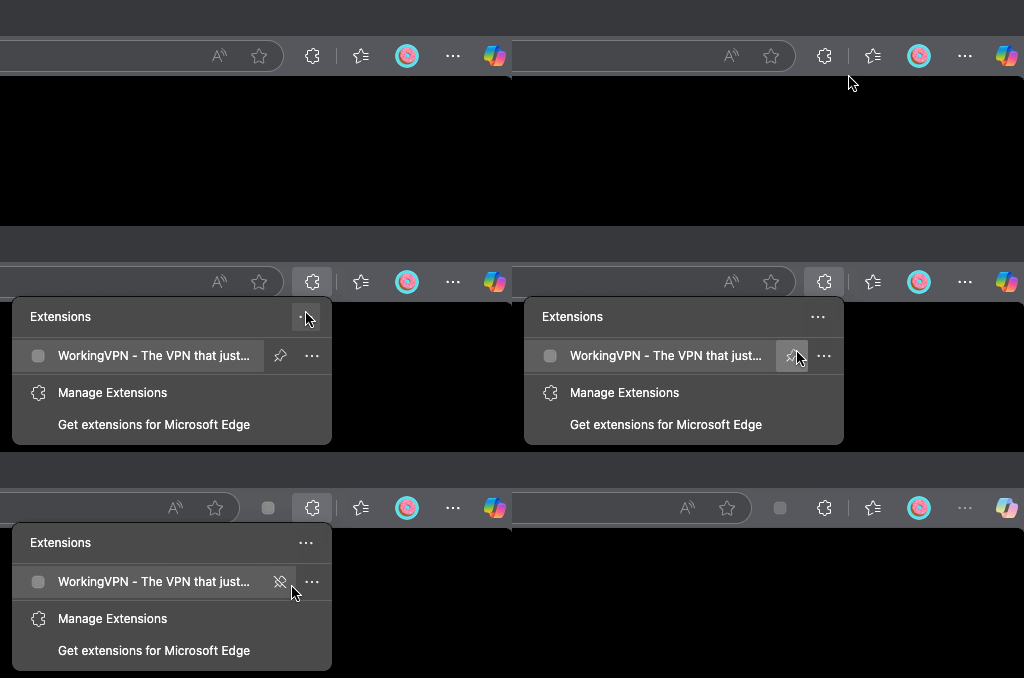
For Edge users:

  1. Click the extensions icon (puzzle piece) in the top-right
  2. Find WorkingVPN in the dropdown
  3. Click the pin icon next to it
How to pin extension in Edge

To pin the extension:

  1. Look for the extensions or add-ons section in your browser
  2. Find WorkingVPN in the list
  3. Pin it to your toolbar for easy access

Want faster speeds and more locations?

Upgrade to Premium for lightning-fast connections, access to all server locations, and priority support.

Upgrade to Premium
3-day free trial available