
Can't find the extension icon
If you can’t see the WorkingVPN icon in your browser toolbar after installing, it’s probably just hidden in the extensions menu. Pin it to make it visible permanently.
- Click the puzzle icon in the top-right of your browser.
- Find WorkingVPN in the dropdown list.
- Click the three dots next to it and choose Pin.

- Click the menu button (three horizontal lines) in the top-right.
- Select Add-ons and themes.
- Click Extensions.
- Find WorkingVPN and click the settings icon.
- Select Pin to Toolbar.

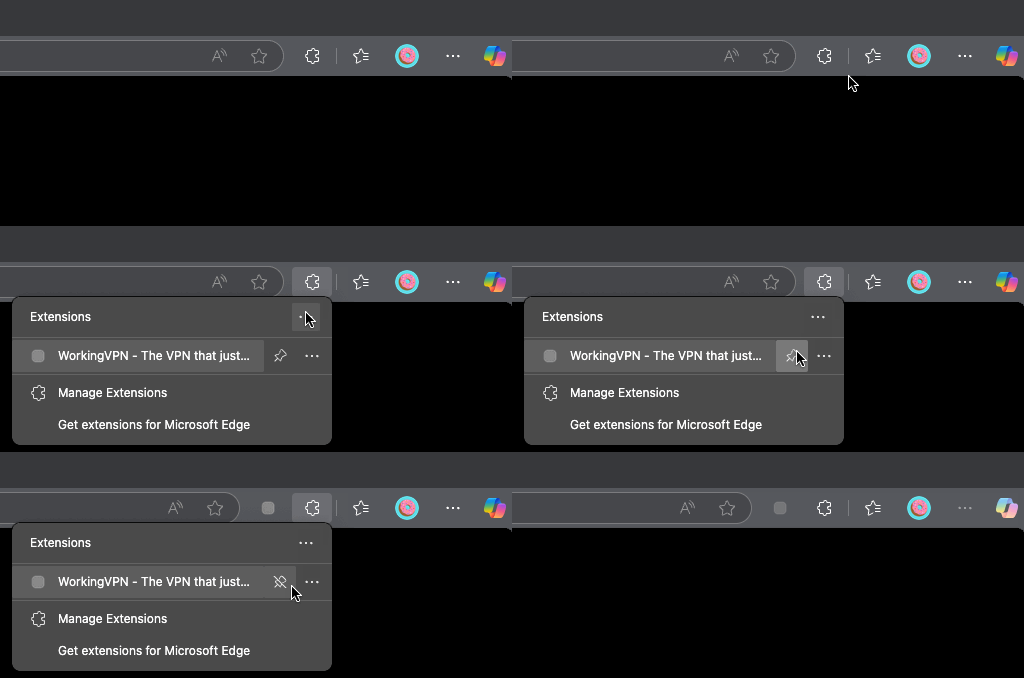
- Click the extensions icon (puzzle piece) in the top-right.
- Find WorkingVPN in the dropdown.
- Click the pin icon next to it.
Still can’t see it?
Section titled “Still can’t see it?”If you’ve pinned WorkingVPN and it’s still missing:
- Check the extension is actually installed. Open your browser’s extensions page and confirm WorkingVPN is present and enabled.
- Try disabling and re-enabling the extension from the extensions page.
- Reinstall from the relevant store: